Does the model suit your lighting task?
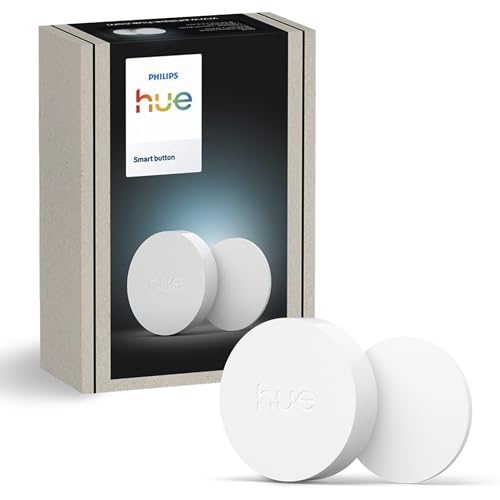
Philips Hue Smart Button, wireless button with Zigbee and Bluetooth stands in this selection for switching, dimming and changing scenes on existing Hue lights. That is a narrower and more honest statement than a blanket “good” or “bad”. A lamp can be technically sound and still disappoint in the wrong place. This review therefore starts with the intended use, not with a score.
With a bridge, Philips states a maximum of 50 controllable lights per switch. Without a bridge, the Bluetooth route remains, and with Hue that has always been limited to a much smaller number of lights in one room. If you run a single Hue lamp via Bluetooth, you get a switch for it, but not the advertised automation.
For this model, 6 readable product features from the Amazon listing are available. They are not presented as independently confirmed measured values. We explicitly separate what the source states from our practical assessment. We do not claim any long-term, laboratory or room evaluation of our own. We reproduce the quoted listing texts unchanged in content, but apply the house punctuation: dashes become a colon or comma, ranges of values are written out with “to”, and special characters and promotional symbols are removed. Numbers, units and statements are left untouched.
Product data and sources
| Product | Philips Hue Smart Button, wireless button with Zigbee and Bluetooth |
|---|---|
| Brand | Philips Hue |
| Category | Smart lighting |
| ASIN | B0FB44Z391 |
| Sources as of | 6 August 2026 |
| Type of research | Data and source analysis; no laboratory or long-term trial of our own |
Listing statement: Control the lighting with one click
What the source says: Control the lighting with one click: A simple press of the button is enough to switch the lighting on and off, cycle through scenes and much more. Hold the button down to dim or brighten the room.
Why this matters: Dimming is done by the electronics in the device, controlled by app or remote control. A wall dimmer is neither needed nor intended for this; what matters is the way of operating it, the number of steps and whether the last chosen level can be remembered.
Listing statement: Get the ideal light for the whole day
What the source says: Get the ideal light for the whole day: The button uses the time-based light function by default, which gives you the ideal light for every moment of the day.
Why this matters: This point should be checked against dimensions, instructions and the existing installation before buying. A listing can contain variants or shortened wording. This function also belongs to bridge operation. Philips states on its own product page a maximum of 50 lights per switch and expressly ties this figure to the Hue Bridge.
Listing statement: Customise in the app
What the source says: Customise in the app: Define the rooms or zones your button controls, adjust the settings to control lights or start an automation, choose the scenes you want for each time slot and much more in the Hue app.
Why this matters: The system detail should be matched against your existing smart home. Basic functions and manufacturer-specific effects are not automatically available in the same way on every platform.
Listing statement: Start/stop automations
What the source says: Start/stop automations: Start or stop an automation created in the Automations tab with a simple press of the button.
Why this matters: This statement describes a product feature, but does not yet answer whether it is practical for switching, dimming and changing scenes on existing Hue lights. The link to the planned place of use is decisive. This function requires the Hue Bridge, because automations are created in the corresponding tab of the Hue app and run via the bridge. The German listing text does not mention the bridge anywhere.
Listing statement: Flexible, wireless mounting
What the source says: Flexible, wireless mounting: Use the supplied adhesive to fix the button in your home, or place it on any magnetic surface.
Why this matters: This point should be checked against the dimensions, instructions and existing installation before you buy. A listing can contain variants or shortened wording.
Listing statement: In accordance with the EU energy efficiency labelling directive…
What the source says: In accordance with the EU energy efficiency labelling directive, this product does not require energy labelling information due to its parameters.
Why this matters: For the assessment, what counts is whether this feature brings a concrete advantage in everyday use. Without a matching lighting task, it remains mainly a data sheet point. This note is factually correct. A switch gives off no light, is therefore not a light source within the meaning of the regulation, and consequently needs neither an energy label nor a registration in the EU product register.
Use in daily life
The listing describes the fixing correctly: supplied adhesive or a magnetic surface. The button measures 45 millimetres in diameter and weighs 40 grams, so it can also be taken off and held in the hand. Power comes from a standard coin cell of type CR2032, for which Philips states at least two years of run time and 50,000 clicks of mechanical lifetime.
For this model, the purchase decision should therefore hinge on a concrete situation. Before buying, write a sentence such as: “I need light for …” and add place, time of day and activity. If the model does not clearly fulfil this task, an alternative from the same category is probably the better choice.
With IP20, the button belongs in dry indoor rooms, and the permitted range is between 0 and 40 degrees. Bathrooms and outdoor areas are therefore ruled out. A note from the listing is also correct: a switch needs no energy labelling, because it is not a light source within the meaning of the regulation. A search in the European product register consequently remains without result for this device.
Strengths and limits of the assessment
What speaks for the model
- Product image, ASIN and listing data are clearly linked to one another.
- The design can be matched to a specific lighting task: for switching, dimming and changing scenes on existing Hue lights.
- The available features allow a targeted check before buying, without inventing a star rating.
What remains open
- No long-term use of our own, no light measurement and no documented load check.
- Listing details can be abbreviated or change with variants and model updates.
- Room effect, glare and ease of use depend on your location and daily routine.
The most common wrong purchase happens with Hue users without a bridge who buy the switch for the automations. The second point is the mounting location: with IP20, the button belongs in dry indoor rooms, not in the bathroom and not outdoors.
What you should measure and check before buying
Check before buying whether there is a Hue Bridge in your household. Without one, the time-based light function and the automations are lost, and these are exactly the two points the listing text advertises.
- Clarify the bridge: Without a Hue Bridge, automations and the time-based light function are lost. The listing text does not say so.
- Count the lights: With a bridge, Philips states a maximum of 50 lights per switch. Over Bluetooth it is clearly fewer.
- Check the mounting location: IP20 means a dry indoor room between 0 and 40 degrees. Bathrooms and outdoor areas are ruled out.
- Choose the fixing: Supplied adhesive or magnetic surface. Both can be removed again.
- Plan for the battery: According to Philips, a CR2032 lasts at least two years. Keeping a spare at home saves a trip later.
If you are unsure how much light your room needs at all, work it out once: the lumens to watts chart puts wattage figures into terms of actual brightness, and how many lumens per room are needed depends on floor area and activity. More models in this area are listed in the overview under smart lighting, and the lighting calculator translates your room into a specific target brightness.
Set-up, position and first check
First check whether a bridge is present, and then set up the switch in the Hue app. Give it an understandable name so that guests also know what the button operates. Try out the assignment on a single light before you fix the adhesive for good.
After set-up, do not judge the light only in daylight. In the evening, switch the rest of the lighting as you normally use it, and check the situation from seated, standing and walking height. Only then do disturbing reflections, hard shadows or an unfavourable switch position become visible.
Keep the instructions and the model designation. That helps with a fresh app setup, with firmware questions and in a guarantee claim. Replacing the light source is not intended; at the end of its rated lifetime the whole device is replaced.
Comparison with similar models
The comparison does not name winners. It shows models of the same category so that you can see whether one of them is closer to your lighting task. If two models have the same task in the Assessment column, they do not differ in purpose but in design, dimensions and features. The column then states what is actually different according to the sources.
| Model | Brand | Assessment | Details |
|---|---|---|---|
| Philips Hue Smart Button, wireless button with Zigbee… | Philips Hue | for switching, dimming and changing scenes on existing Hue lamps | This review |
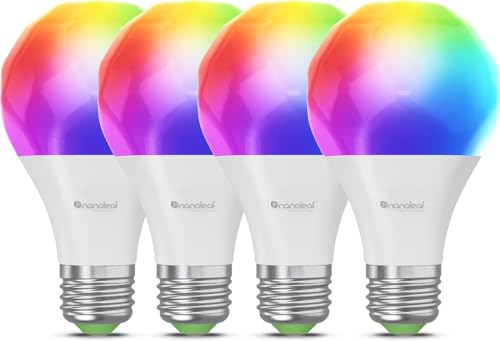
| Nanoleaf Matter Essentials E27 4-pack | Nanoleaf | for four E27 lamp holders with coloured and white light directly over your own Wi-Fi, without Thread and only on the 2.4 GHz network | Read the review |
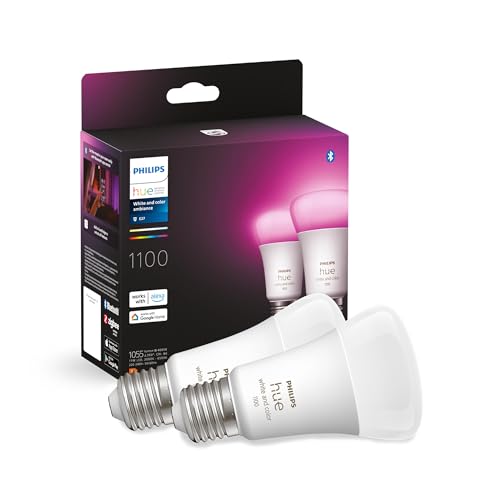
| Philips Hue White & Color Ambiance E27 LED light bulb | Philips Hue | for smart control in a technically suitable lamp holder | Read the review |
Our buying decision
Philips Hue Smart Button, wireless button with Zigbee and Bluetooth makes sense if you are looking for a device for switching, dimming and changing scenes on existing Hue lights, have checked the dimensions at the intended spot and will actually use the functions named in the listing. The purchase is less convincing if you expect one universal solution for several conflicting lighting tasks.
Keep looking if key data such as dimensions, light output, IP rating or compatibility is not clearly documented for your intended use. The same applies if you only like the look of the design, but the cable, the floor space or the controls would get in your way in daily use.
We deliberately award no stars. A numerical score would suggest a measurement accuracy that does not exist without documented hands-on testing. The statement this page can support is narrower: which details are available, what the model may be suited for, and which questions remain open before you buy?
Frequently asked questions about the Hue Smart Button
Do I need a Hue Bridge for the Smart Button?
For the full range of functions, yes. Philips names Bluetooth and Zigbee as radio routes on the product page, but states the maximum of 50 lights per switch explicitly for operation with the Hue Bridge, and heise online writes that the bridge is needed for integration into the smart home. In the German listing text the word bridge does not appear anywhere.
Which battery is inside and how long does it last?
It is a standard coin cell of type CR2032, and Philips states a minimum run time of two years. Philips gives the mechanical lifetime of the button as 50,000 clicks.
Can I fit the button in the bathroom or outdoors?
No. Philips lists the Smart Button with IP20 protection and an operating temperature of 0 to 40 degrees, which makes it a device for dry indoor rooms. It is not built for bathrooms or outdoor areas.
How is the button attached?
With the supplied adhesive on a smooth surface or magnetically on a metal surface. The button measures 45 millimetres in diameter and weighs 40 grams, so it can also be picked up and carried around.
How many lights can one switch control?
Philips states a maximum of 50 lights per switch and explicitly names the Hue Bridge in this context. Without a bridge, the Bluetooth route remains, with a much smaller number of lights in one room.
Sources and currency
The sources are ranked by their closeness to the product: manufacturer documents come before retailer or comparison data. A shop listing is useful for the variant currently on offer, but it is not an independent check. Missing documents are not replaced with invented experiences.
- Philips Hue product page for the third-generation Smart Button: communication via Bluetooth and Zigbee, battery type CR2032 with a stated minimum run time of two years, IP20 protection, diameter 45 millimetres, net weight 0.04 kilograms, operating temperature 0 to 40 degrees, lifetime 50,000 clicks, two-year guarantee, material number 929004582202. Expressly stated: a maximum of 50 lights per switch, and according to Philips this figure applies with the Hue Bridge.
- Report by heise online on the announcement of the new Smart Button: Zigbee 3.0 and Bluetooth as radio routes, CR2032 as the battery with about two years of run time under average use, and the assessment that a Hue Bridge is needed for integration into the smart home.
- Amazon product listing B0FB44Z391; product data via the Creators API, retrieved 6 August 2026 Advertisement
Content checked on 6 August 2026. Prices, availability and product variants may change independently of this page. For a final check, always use the current retailer listing and any available manufacturer documents.
If a linked source is no longer reachable, or the model on offer visibly differs from the product image and designation, this analysis is no longer the right basis for a decision. In that case the current model number is what counts. Tell us about the difference via the contact page (in German), so that the data, the link and the recommendation can be checked.