Does the model suit your lighting task?
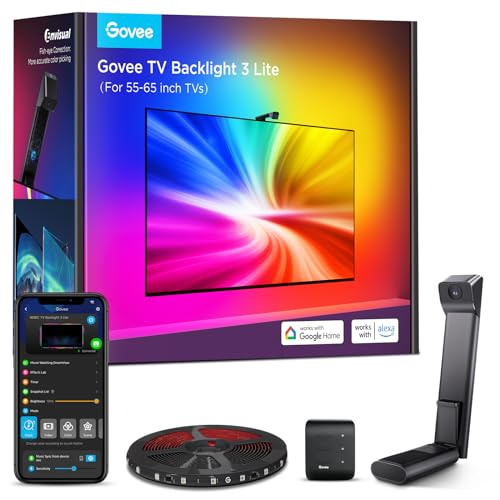
Govee TV Backlight 3 Lite H6097 stands in this selection for the camera-controlled backlight behind a flat TV of 40 to 50 inches. It is not intended for curved sets, for wall mounting without space behind the screen, or as room lighting. That is a narrower and more honest statement than a blanket “good” or “bad”. A lamp can be technically sound and still disappoint in the wrong place. That is why this analysis starts with the intended use, not with a score.
A single Wi-Fi lamp can make sense without an additional hub. With many lights, sensors and switches, a hub system often becomes clearer to manage. The right architecture therefore depends more on the planned expansion than on the first device you buy.
The listing carries 7 usable product features. The 6 most informative are assessed individually below. They are not presented as independently confirmed measurements. We explicitly separate what the source states from our practical assessment. We do not claim any long-term, laboratory or room trials of our own. We reproduce the quoted listing texts unchanged in content, but apply our house punctuation: dashes become a colon or comma, ranges of values are written out with “to”, and special characters and advertising symbols are removed. Figures, units and statements remain untouched.
Product data and sources
| Product | Govee TV Backlight 3 Lite H6097 |
|---|---|
| Brand | Govee |
| Category | Smart lighting |
| ASIN | B0D6GCWMXH |
| Sources as of | 26 August 2026 |
| Type of research | Data and source analysis; no laboratory or long-term trial of our own |
Listing claim: Improved Govee Envisual technology
What the source says: Improved Govee Envisual technology: The advanced chip offers stronger performance with a fish-eye correction function that extends the coverage and enables more accurate colour matching at the edges.
Why it matters: This claim describes a product feature but does not yet answer whether it is practical for the camera-controlled backlight behind a flat TV of 40 to 50 inches. What matters is the link to the planned location. The correction fixes the distortion of the camera's own wide-angle lens, it does not improve the optics. Govee lists the 3 Lite with a single camera and a field of view of 180 degrees, while the TV Backlight 3 uses two cameras of 144 degrees each and the 3 Pro three cameras of 86 degrees each. The wider the viewing angle, the stronger the distortion at the edges, and that is exactly what the software is meant to straighten out. Govee itself writes in the FAQ that a slightly curved calibration image is normal.
Listing claim: 4-in-1 lamp bead
What the source says: 4-in-1 lamp bead: The RGBICW TV backlight adds an extra warm white chip to the colour mix, so that the purer white tone and the improved pixel density provide a more vivid lighting effect.
Why it matters: The colour temperature mentioned describes the effect, not the brightness. What matters in daily use is whether fixed steps or a continuous range are offered and whether the setting is saved. In Govee's own comparison table the 3 Lite appears with 30 lamp beads per metre and 120 lumens per metre. The TV Backlight 3 is listed there with 60 beads and 235 lumens per metre, the 3 Pro with 75 beads and 337 lumens per metre. Within the current Govee range, this model is therefore the most sparsely populated. The comparison that the improved pixel density comes from is a comparison with an earlier version of the same series and not with the sibling models.
Listing claim: Gravity mount for the camera
What the source says: Gravity mount for the camera: This design allows easy installation and also adapts to ultra-thin TVs. The adhesive can be used to hold the camera steady during installation.
Why this matters: For the assessment, what counts is whether this feature brings a concrete advantage in daily use. Without a suitable lighting task, it remains mainly a data sheet point.
Listing claim: Govee DreamView sync
What the source says: Govee DreamView sync: This function allows the connection of up to 7 sub-devices and the syncing of light effects from the 3 Lite. This makes 360° immersive experiences and light mapping effects possible at home.
Why it matters: This claim describes a product feature but does not yet answer whether it is practical for the camera-controlled backlight behind a flat TV of 40 to 50 inches. What matters is the link to the planned location. This claim is correct and appears word for word at Govee too. However, it only describes how many further Govee lights can take over the light effects, such as light bars or additional strips. According to the manual, the contents are one each of LED light strip, adapter, controller, camera and user manual. The promised all-round experience therefore only comes with further purchases.
Listing claim: Compatibility with any TV picture content
What the source says: Compatibility with any TV picture content: The 3 Lite captures the colour of any TV screen instantly and adapts to it without compatibility problems. You can use the TV LED strip when watching TV, online videos, playing games and so on.
Why it matters: This point should be checked against dimensions, instructions and the existing installation before you buy. A listing can contain variants or shortened wording. Govee itself names three hard limits that this line does not mention. The FAQ on the manufacturer's site says that the TV's bezel thickness must be between 4 and 35 millimetres and that curved TVs are not supported. It also says that after the camera correction a colour adjustment is needed, because of differences between panels, so that the colours come close to those of the screen. The picture content is therefore compatible, not every device.
Listing claim: Intelligent control
What the source says: Intelligent control: This is controlled via the Govee Home app or Alexa & Google Assistant. The app gives you the option to use several functions such as the removal of black bars, the detection of an empty screen and so on.
Why it matters: The system claim should be checked against your existing smart home. Basic functions and manufacturer-specific effects are not automatically available in the same way on every platform. The app is not an optional extra but a requirement. The manual describes pairing and camera calibration exclusively through the Govee Home app and requires a router with 2.4 GHz to 802.11 b/g/n for it; 5 GHz is explicitly not supported. Bluetooth must be active during setup. Without Wi-Fi, all that remains on the unit is the small controller with three buttons for on and off, colour and music, and picture synchronisation is then lost entirely.
Use in daily life
Matter improves cooperation between different platforms, but does not guarantee that every special function of a manufacturer app is available everywhere. Scenes, music modes or segment control may still remain tied to the respective app.
For this model, the purchase decision should therefore hinge on a concrete situation. Before buying, write a sentence such as: “I need light for …” and add place, time of day and activity. If the model does not clearly fulfil this task, an alternative from the same category is probably the better choice.
The wall switch remains a practical weak point. If a smart lamp is cut off from power there, the app and automations cannot be reached. Good planning therefore also clarifies how guests and other members of the household operate the light.
Strengths and limits of the assessment
What speaks for the model
- Product image, ASIN and listing data are clearly linked to one another.
- The design can be matched to a specific lighting task: for the camera-controlled backlight behind a flat TV of 40 to 50 inches, not for curved sets, not for wall mounting without space behind the screen and not as room lighting.
- The available features allow a targeted check before buying, without inventing a star rating.
What remains open
- No long-term use of our own, no light measurement and no documented load check.
- Listing details can be abbreviated or change with variants and model updates.
- Room effect, glare and ease of use depend on your location and daily routine.
The most common wrong purchase is the TV that is too large: at 50 inches there are clear gaps at the top, bottom and sides, because the strip measures only 2.4 metres. The second most common is wall mounting without space behind, because without a surface to light there is no lighting effect. Next comes the network: if you only offer a 5 GHz band, you will not complete the calibration and end up with a strip that glows in colour but does not play along. And if you expect the camera to get the colours perfect on its own, you will have to rework them, because that is exactly what Govee writes in its own FAQ.
What you should measure and check before buying
First measure the gap between the back of the TV and the wall: Govee recommends 10 to 20 centimetres, below that the effect fizzles out. Then measure the thickness of the screen bezel, which must be between 4 and 35 millimetres, and check whether your set is really flat and not slightly curved. Finally work out the perimeter of the back, width plus height times two, and compare it with the 2.4 metres of strip from the manual. Also check whether your router provides a 2.4 GHz network, because 5 GHz alone is not enough.
- Define the task: Write down which surface or zone is to be lit and at what time of day you use it.
- Measure the space: Check the standing or mounting surface, height, cable route and reachable socket. Product photos are no substitute for measurements.
- Compare the light data: Check light output, colour temperature, dimming and, if needed, IP rating in the current listing or manual.
- Think through the controls: The switch, app, sensor or remote control must be reachable and understandable in daily use at the planned location.
- Check the variant: Colour, size and set contents can differ within one listing, and often the technical details in the description text with them. Compare the selected variant with this analysis.
If you are unsure how much light your room needs at all, work it out once: the lumens to watts chart puts wattage figures into terms of actual brightness, and how many lumens per room are needed depends on floor area and activity. More models in this area are listed in the overview under smart lighting, and the lighting calculator translates your room into a specific target brightness.
Set-up, position and first check
First set up a single light and check the app, voice control and behaviour after a power cut. Assign understandable room and device names. Only once the basic operation works reliably is it worth building scenes and automations.
After set-up, do not judge the light only in daylight. In the evening, switch the rest of the lighting as you normally use it, and check the situation from seated, standing and walking height. Only then do disturbing reflections, hard shadows or an unfavourable switch position become visible.
Keep the instructions and the model designation. That helps with a fresh app setup, with firmware questions and in a guarantee claim. Replacing the light source is not intended; at the end of its rated lifetime the whole device is replaced.
Comparison with similar models
The comparison does not name winners. It shows models of the same category so that you can see whether one of them is closer to your lighting task. If two models have the same task in the Assessment column, they do not differ in purpose but in design, dimensions and features. The column then states what is actually different according to the sources.
| Model | Brand | Assessment | Details |
|---|---|---|---|
| Govee TV Backlight 3 Lite H6097 | Govee | for camera-controlled backlighting behind a flat television of 40 to 50 inches, not for curved sets, not for wall mounting without air behind the screen and not as room lighting | This review |
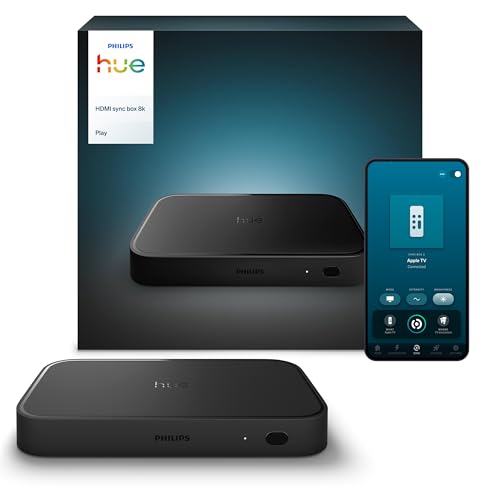
| Philips Hue Play HDMI Sync Box 8K | Philips Hue | for synchronising existing Hue lamps with HDMI sources | Read the analysis |
| Govee TV backlight 3 Lite | Govee | for camera-based TV backlighting without an HDMI connection | Read the analysis |
Our buying decision
Govee TV Backlight 3 Lite H6097 makes sense if you are looking for a light for the camera-controlled backlight behind a flat TV of 40 to 50 inches, have checked the dimensions at the intended location and will actually use the functions named in the listing. The purchase is less convincing if you expect a universal solution for several conflicting lighting tasks.
Keep looking if key data such as dimensions, light output, IP rating or compatibility is not clearly documented for your intended use. The same applies if you only like the look of the design, but the cable, the floor space or the controls would get in your way in daily use.
We deliberately award no stars. A numerical score would suggest a measurement accuracy that does not exist without documented hands-on testing. The statement this page can support is narrower: which details are available, what the model may be suited for, and which questions remain open before you buy?
Frequently asked questions about smart lighting
How long is the strip really?
The Govee manual for the H6097 gives 0.4 metres for each of the two sides and 0.8 metres for the top and bottom, so 2.4 metres in total. On a 50-inch set that is roughly 110.7 centimetres wide and 62.3 centimetres high, a good stretch of each edge stays unlit. On a 40-inch set the length almost matches the perimeter. The listing itself does not state a length anywhere.
What decides whether the colour detection works?
Govee names four conditions. The TV must be flat, because Govee excludes curved sets, and its bezel thickness must be between 4 and 35 millimetres. The camera must sit at the top centre of the screen, and the calibration with seven stuck-on dots must succeed without crossing lines. You also need a router on the 2.4 GHz band, because according to the manual 5 GHz is not supported. Govee also states itself that the colours still have to be adjusted by hand after calibration.
How bright does the backlight get?
Govee gives 120 lumens per metre for the 3 Lite, which works out at roughly 288 lumens over 2.4 metres. That is about the same as an old 25-watt incandescent bulb and is meant as effect lighting behind the screen, not as room lighting. Govee does not state a total figure for this model, the calculation is ours.
Which energy efficiency class does the set have?
The German-language section of the manual states word for word that this product contains a light source of energy efficiency class G. That fits the numbers: around 288 lumens from a controller supplied with 12 volts and 2 amps gives only about 24 lumens per watt even at half load. Class F only starts at 85 lumens per watt under Regulation (EU) 2019/2015. That is usual for a colour effect strip and not a reason to rule it out, but it should not come as a surprise to anyone.
Is it the same strip as the version for 75 to 85 inches?
It is the same series, but a different model. Govee lists H6099 for 55 to 65 inches and 75 to 85 inches, H6097 for 40 to 50 inches and H6690 for 32 inches. Camera, controller and LED bead density are the same, while strip length and power supply differ: 12 volts at 2 amps here against 3 amps for the large version. If you read user reports on the 75-inch variant, you cannot carry the brightness over one to one.
Can I shorten the strip or use it without the app?
No Govee document says anything about shortening, neither the product page nor the manual. There is therefore no approval for it, and the strip is designed with fixed segment lengths for corners. Setup does not work at all without the Govee Home app, because pairing and camera calibration take place only there. Afterwards, on the unit itself, you are left with the three buttons on the controller for on and off, colour and music mode.
Sources and currency
The sources are ranked by their closeness to the product: manufacturer documents come before retailer or comparison data. A shop listing is useful for the variant currently on offer, but it is not an independent check. Missing documents are not replaced with invented experiences.
- Listing page for ASIN B0D6GCWMXH with the seller's seven bullet points: improved Envisual technology with fish-eye correction, 4-in-1 lamp bead with an additional warm white chip, gravity mount for the camera, DreamView with up to 7 sub-devices, control via the Govee Home app as well as Alexa and Google Assistant, removal of black bars and detection of an empty screen, plus the note that the strongest light effect comes at a wall distance of 10 to 20 centimetres. Neither a strip length nor a lumen figure, a wattage, an energy efficiency class or the Wi-Fi requirement appears in these points. Amazon listing B0D6GCWMXH, not linked
- Govee EU shop, German country page for the TV Backlight 3 Lite. The model assignment is stated there word for word: H6099 for 55 to 65 inches and 75 to 85 inches, H6097 for 40 to 50 inches, H6690 for 32 inches. The variant for 40 to 50 inches carries the item number H60973D1 in the listing data. The comparison table assigns the 3 Lite a single-camera system, 30 lamp beads per metre, 120 lumens per metre, a lens construction of 4G plus IR and a field of view of 180 degrees. Alongside it are the TV Backlight 3 with dual camera, 60 beads, 235 lumens per metre and twice 144 degrees, and the 3 Pro with triple camera, 75 beads, 337 lumens per metre and three times 86 degrees. The FAQ on the same page gives the permitted screen thickness of 4 to 35 millimetres, excludes curved TVs, requires 2.4 GHz Wi-Fi and states that a colour adjustment is needed after the camera correction because of panel differences. (in German)
- Govee user manual for model H6097, German-language section. The Technical Data table gives adapter power input AC 200 to 240 volts for the EU plug, controller power input 12 volts DC at 2 amps for 40 to 50 inches and, as the length, 0.4 metres for left and right and 0.8 metres for top and bottom, light display technology RGBWIC. The note before it says explicitly: this product contains a light source of energy efficiency class G, the reference setting of the control is 4000 kelvin and white light in the Govee Home app, and the excitation purity is 96.8 per cent for blue at 462.4 nanometres, 82.3 per cent for green at 523.5 nanometres and 100 per cent for red at 636.7 nanometres. On connection it says that a router with 2.4 GHz to 802.11 b/g/n is required, that 5 GHz is not supported and that Bluetooth must be active during pairing. The contents comprise one each of LED light strip, adapter, controller, camera and user manual. For calibration, seven foam stickers are stuck onto the screen, and the calibration lines must not overlap or cross. The guarantee is 12 months. (in German)
- Govee US product page for the TV Backlight 3 Lite with the same core conditions in English: three sizes for 40 to 50, 55 to 65 and 75 to 85 inches, screen thickness 4 to 35 millimetres, 2.4 GHz Wi-Fi required, not suitable for curved TVs, DreamView with up to seven sub-devices.
- licht.de on the energy efficiency classes for light sources in force since 1 September 2021. The table gives the class limits for luminous efficacy: A from 210 lumens per watt, B from 185 to 209, C from 160 to 184, D from 135 to 159, E from 110 to 134, F from 85 to 109 and G below 85 lumens per watt. This is how the class G in the Govee manual is to be placed. (in German)
- German Environment Agency (Umweltbundesamt) on energy consumption labelling of lamps and luminaires: Regulation (EU) 2019/2015 reintroduced the class scale from A to G on 1 September 2021. It is the legal basis for the class stated in the Govee manual. (in German)
- Amazon product listing B0D6GCWMXH; product data via the Creators API, retrieved 26 August 2026 Advertisement
Content checked on 26 August 2026. Prices, availability and product variants may change independently of this page. For the final check, always use the current retailer listing and any manufacturer documents.
If a linked source is no longer reachable, or the model on offer visibly differs from the product image and designation, this analysis is no longer the right basis for a decision. In that case the current model number is what counts. Tell us about the difference via the contact page (in German), so that the data, the link and the recommendation can be checked.